
Service Catalog
The Console UI is driven by two declarative JSON files. Together they define which third-party services the provider picker can offer, and which Console modules show up in the dashboard navigation. Editing them is the easiest way to extend the surface without touching React or routes.
| File | Purpose |
|---|---|
src/config/service-catalog.json | Third-party services Cognipeer can integrate with (LLM providers, vector stores, file backends). Drives the provider picker, brand swatches, and search. |
src/config/platform-services.json | First-party Console modules (Models, Prompts, Knowledge Engine, Cluster, …). Drives the dashboard nav, command palette, slim rail, and service launcher. |
Both files are schema-validated (service-catalog.schema.json and platform-services.schema.json sit next to them). Validation runs as part of the build — invalid entries fail the type-check, not at runtime.
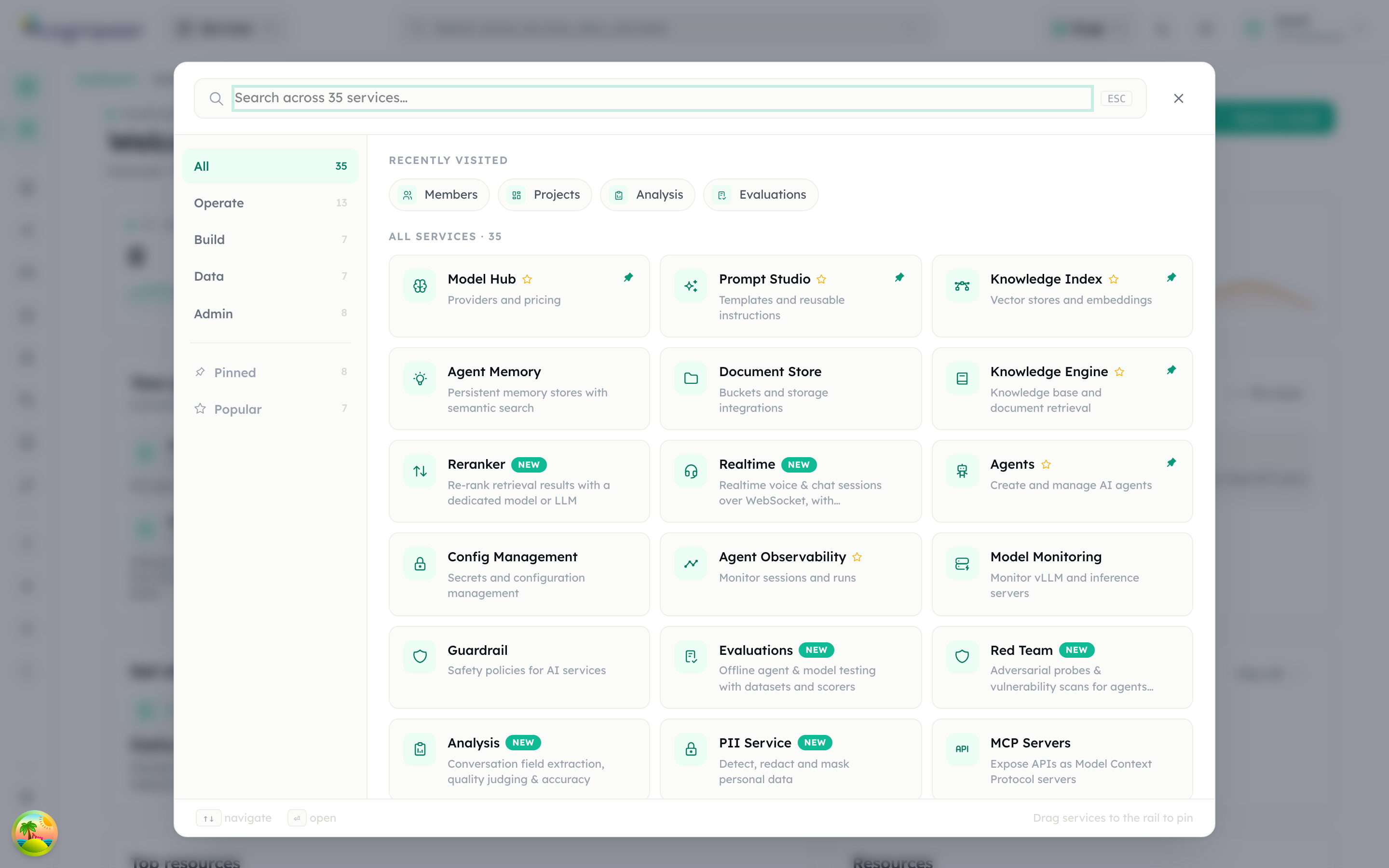
The platform-services.json entries are what the service launcher (the Services button in the header) renders — grouped by category, with NEW badges, "Recently visited", and search:
service-catalog.json
Each entry describes one external service Cognipeer knows how to talk to:
{
  "id": "anthropic",
  "driver": "openai-compatible",
  "name": "Anthropic",
  "tagline": "Claude 4 family via OpenAI-compatible endpoint",
  "description": "Claude Opus, Sonnet and Haiku connected through the OpenAI-compatible adapter.",
  "domains": ["model"],
  "color": "#cc7d4f",
  "tags": ["popular", "tools", "long-context"],
  "aliases": ["claude", "haiku", "sonnet", "opus"]
}| Field | Meaning |
|---|---|
id | Catalog id — what UI code references. |
driver | The backend driver this service maps to. Multiple catalog entries can share a driver (e.g. Anthropic, Groq, DeepSeek all use openai-compatible). |
domains | One or more of model, embedding, vector, file, datasource. Used by the provider picker to filter cards by what the user is creating. |
color | Brand hex for the swatch. |
tags | Free-form filter chips: popular, enterprise, managed, self-hosted, open-source, tools, default, dev, edge. |
aliases | Extra search keywords — typing "claude" finds the Anthropic entry. |
Lookups go through src/lib/services/serviceCatalog.ts:
findServiceById(id)— direct lookup.findServiceByDriver(driver, domain?)— canonical entry for a backend driver, optionally filtered by domain.resolveServiceCatalogEntry({ driver, domain, serviceId, key, label })— best-match resolver used when persisting providers (triesserviceIdfirst, then key/label normalization, then falls back to driver).filterServiceCatalog({ domain, query, tag })— drives the picker grid.
To add a new third-party service: add the entry, pick the right driver (or add a new one under src/lib/providers/contracts/ first), and the picker will surface it on next build.
platform-services.json
Each entry describes a Console module:
{
  "id": "reranker",
  "href": "/dashboard/reranker",
  "icon": "IconArrowsSort",
  "category": "data",
  "navLabelKey": "reranker",
  "navDescriptionKey": "rerankerDescription",
  "tags": ["rerank", "retrieval", "ranking"],
  "searchKeywords": ["rerank", "cohere", "jina", "voyage", "cross-encoder"],
  "badge": "new"
}| Field | Meaning |
|---|---|
category | build, data, operate, admin — sets the slim-rail bucket. Order comes from categories.order. |
navLabelKey / navDescriptionKey | i18n keys resolved via src/lib/i18n/messages/{en,tr}.ts. |
icon | Tabler icon name. |
searchKeywords | Tokens the command palette will match against (multi-language). |
defaultPinned | Optional. Pinned to the slim rail out of the box. |
popular | Optional. Surfaced on the services home. |
badge | Optional. "new" shows a "New" pill. |
tenantAdminOnly | Optional. Hidden for non-admins. |
showInServicesHome | Optional. Set to false to keep an entry out of the launcher grid (used for the services-home entry itself). |
The Service Launcher, Slim Rail, TopbarV2, breadcrumbs, and the Command Palette all read from this file. Adding a new entry is enough to make a new dashboard route discoverable.
How they interact
When the user opens the provider picker, the UI calls filterServiceCatalog({ domain: 'model' }) and renders a card per catalog entry. When the user clicks one, the form posts to the providers API with the catalog id; the backend resolves the canonical entry via resolveServiceCatalogEntry and stores the resulting driver on the provider record.
When the dashboard mounts, the launcher reads platform-services.json, resolves labels through i18n, filters out tenant-admin-only entries for non-admins, and builds the slim rail / command-palette index. There is no separate database registration for first-party services — JSON is the source of truth.