
Build and publish an agent
An agent in Console is a saved definition: one model, a system prompt, an optional Knowledge Engine module, optional guardrails, and a list of bound tools. You assemble it in the dashboard, try it in the Playground, then publish it — and publishing is the step that decides which definition your production traffic actually runs.
This page takes one agent from nothing to a published version other systems can call.
Who this is for
Both halves of the team. Every step names the control you click; every step then gives the endpoint, the payload and the trap underneath it. Follow the click-path or skip to Doing all of this over the API — the result is the same record.
What you end up with
model ──┐
prompt ─┼──► agent (draft) ──► Playground ──► Publish ──► version 1, 2, 3 …
tools ──┤                          │                          │
guards ─┘                          │                          ├─► POST /agents/responses
                                   │                          ├─► A2A (JSON-RPC)
                                   └─ POST /responses         └─► evaluation + red-team targets
                                      (draft)
The draft is what you edit and what the Playground runs. A published version is an immutable snapshot. Both exist at the same time, and they can differ — that is the point of publishing, and it is also the single thing people get wrong.
Before you start
| You need | Where |
|---|---|
| At least one model in the LLM category | Create your first model. Only llm models appear in the agent's model picker. |
| An API token, if you want to call the agent from outside | Settings → API Tokens → Create Token |
| Optional — a Knowledge Engine module | Knowledge Engine |
| Optional — a guardrail, already enabled | Add a guardrail and a PII policy. The picker lists enabled guardrails only. |
| Optional — an upstream API spec or an MCP server to bind as tools | Covered in step 3 |
Everything on this page runs on a community install. Three sub-features are Enterprise and are marked where they appear: MCP Hubs, the persistent sandbox execution mode for stdio MCP servers, and Aegis shield enforcement.
1. Create the agent
Open Build → Agents (/dashboard/agents). The page header reads Build · Agents.
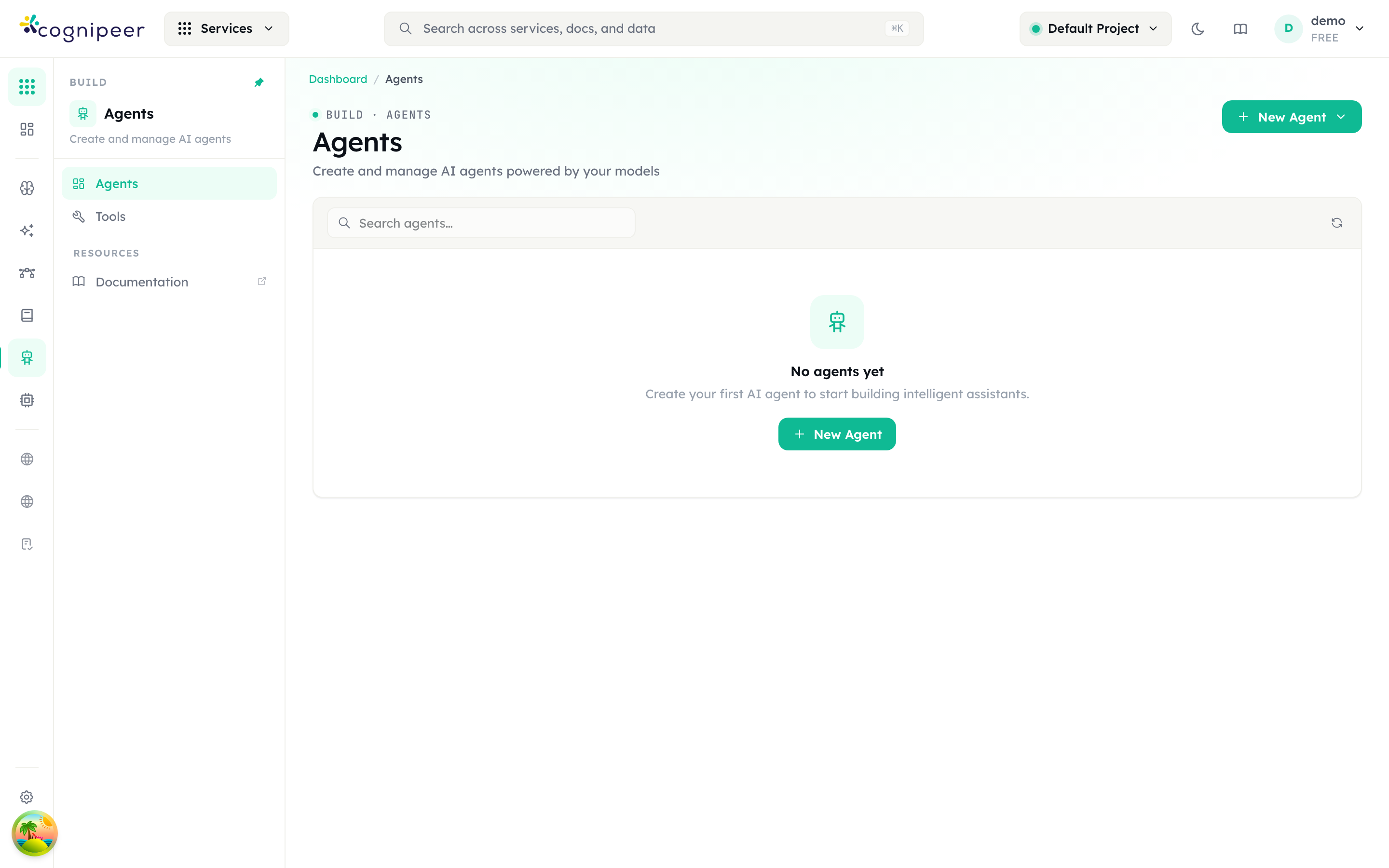
The New Agent button opens a menu with two choices:
| Menu item | Subtitle in the menu | Use it when |
|---|---|---|
| New Agent | Build a native agent powered by your models | Console runs the agent: your model, your prompt, your tools. This is the rest of this page. |
| Connect Agent | Connect an external agent over a2a or OpenAI-compatible APIs | The agent already runs somewhere else and you want to manage, expose and observe it from Console. See Connecting an agent that already exists. |
Pick New Agent. The Create Agent panel opens — "A native agent powered by one of your registered models."
| Section | Field | Notes |
|---|---|---|
| 1 · Identity | Name (required) | Placeholder My Assistant. Also seeds the agent key — see below. |
| Description | Optional. Shown under the name in the list. | |
| 2 · Model | Model (required) | Placeholder "Select a model". Lists LLM models only, as Display name (Model ID). |
Create saves the agent and drops you straight onto its detail page.
The agent key is not the name you typed
The key is generated as the slugified name plus a random six-character suffix — Support Bot becomes something like support-bot-a1b2c3. It is what the API expects in the model field, and nothing in the dashboard changes it afterwards. Read the real key off the Usage tab, whose code samples are generated with it, or from GET /api/client/v1/agents.
The agent is created with status active and a temperature of 0.7. Nothing else is set yet.
2. Configure it
The detail page opens on the Playground tab. Its left-hand column is the Configuration card; the right-hand column is the chat. Work down the card.
| Control | What it does | Stored as |
|---|---|---|
| Model | The LLM that backs the agent. Only llm-category models are offered. | config.modelKey |
| Prompt Mode | Custom Prompt — write the prompt here. Select Prompt — reference a saved template from Prompt Studio. | config.systemPrompt or config.promptKey |
| System Prompt | The prompt text, in Custom Prompt mode. | config.systemPrompt |
| Prompt Template | The saved prompt, in Select Prompt mode. | config.promptKey |
| Knowledge Engine | "Attach a Knowledge Engine module as a retrieval tool for the agent." Lists active modules. | config.knowledgeEngineKey |
| Input Guardrail | "Applied to user messages before processing." | config.inputGuardrailKey |
| Output Guardrail | "Applied to assistant responses before returning." | config.outputGuardrailKey |
| Tools → Add Tools | Opens the Select Tools dialog. See step 3. | config.toolBindings |
| Advanced Settings | Collapsed by default: Temperature, Top P, Max Tokens. The card falls back to 0.7 / 1 / 4096 when the agent carries no value. | config.temperature, config.topP, config.maxTokens |
Save Configuration at the foot of the card writes the draft.
The two switchable modes are exclusive: saving in Custom Prompt mode clears the stored prompt key, and saving in Select Prompt mode clears the inline system prompt. Only one of them ever reaches the model.
What attaching a Knowledge Engine actually does
It binds a retrieval tool called knowledge_search that queries the selected module and returns the top 5 matches, joined together, as the tool result.
It also prepends a knowledge-base-first instruction block to your system prompt — a short block telling the model to call knowledge_search before answering factual, documentation, API, setup, troubleshooting or product-behaviour questions, and not to answer before at least one attempt. If your own prompt contradicts that, the injected block goes first and yours follows.
Runtime limits you cannot configure
The agent runtime is created with fixed limits. They are not exposed in the UI, and they matter when you design a tool-heavy agent:
| Limit | Value |
|---|---|
| Tool calls per invocation | 12 |
| Context budget | 48,000 tokens |
| Conversation summarisation triggers at | 32,000 tokens |
| Recent turns kept verbatim | 10 |
3. Give it tools
Tools come from two places, and the difference is worth understanding before you build either.
| Surface | Route | What it is | Binding recorded as |
|---|---|---|---|
| Tools | /dashboard/agents/tools | One upstream API (imported from an OpenAPI or Postman document) or one remote MCP endpoint, flattened into a list of actions. | source: "tool" |
| MCP Servers | /dashboard/mcp | A full MCP server that Console hosts and proxies — from a spec, a remote MCP URL, or an npx/uvx package — reachable by any MCP client, not only your agents. | source: "mcp" |
Use Tools when you want to hand an agent a few endpoints. Use MCP Servers when the same tool surface has to be consumable by external MCP clients as well.
Option A — import an OpenAPI or Postman document as a tool
Go to Build → Agents → Tools. Header eyebrow Build · Agents · Tools; tiles read Total tools, Active, Disabled, Total actions. New tool opens "Register an upstream API or MCP server as a callable tool."
| Section | Fields |
|---|---|
| 1 · Identity | Name (required), Description |
| 2 · Source | Source type — OpenAPI or MCP server |
| 3 · Authentication | Authentication: None · Bearer token · Custom header (Header name + Header value) · Basic auth (Username + Password) |
| 4 · API specification (OpenAPI) | Upstream base URL, Specification |
| 4 · MCP endpoint (MCP server) | MCP endpoint URL, Transport — Streamable HTTP (recommended) or SSE |
The Specification field is the shared spec importer, and it accepts three input methods, chosen with the chips above the box:
| Chip | Behaviour |
|---|---|
| Paste | Paste the document straight in. "Paste an OpenAPI (JSON/YAML) document or a Postman collection." |
| Upload file | Choose file… reads a local .json, .yaml or .yml file into the box. |
| From URL | Specification URL + Fetch. The fetch happens server-side through the SSRF guard, which refuses private-network addresses unless the operator has allowlisted the host. |
The Format select — Auto-detect, OpenAPI / Swagger (JSON or YAML), Postman collection — tells the importer how to read it. YAML and Postman are normalised into OpenAPI on save. Whichever method you use, the content lands in the editable text box, so you can review it before creating.
On the tool's detail page (Build · Agents · Tool):
- Actions (N) lists every action discovered from the document. Each becomes one callable function.
- Playground runs a single action against the real upstream.
- Request Logs records every action call, from agent runs and from the Playground alike.
- Sync Actions re-reads the source and refreshes the action list after the upstream changes.
- Accept caller headers — off by default. Leave it off unless you want API callers to forward their own headers (for example their own
Authorization) to the upstream on a per-request basis.
A tool whose status is Disabled is skipped at runtime even if an agent still has it bound.
Option B — an MCP server
Go to Build → MCP Servers (/dashboard/mcp; the page header reads Build · MCP). The sub-nav has Servers, MCP Hubs and Monitor.
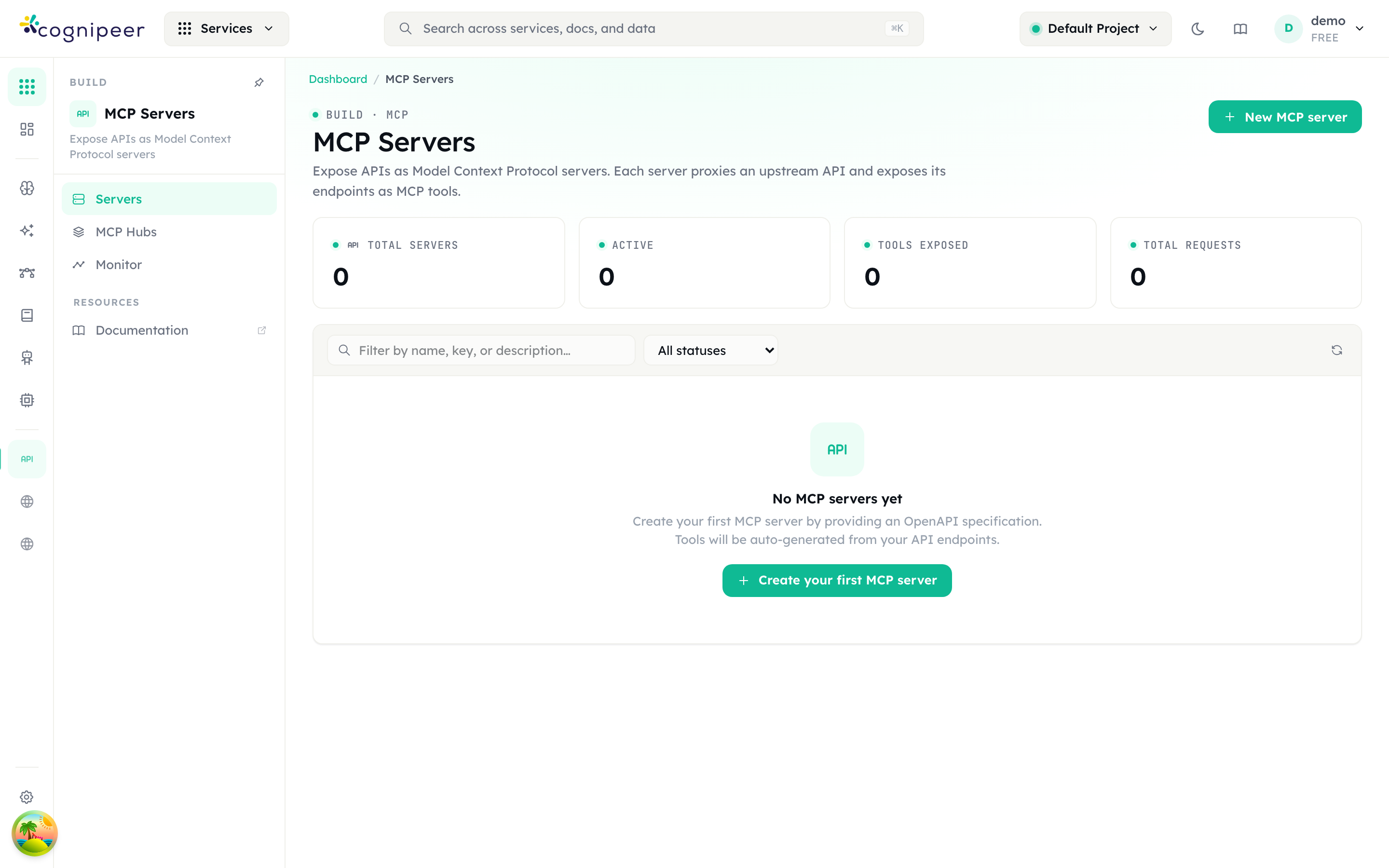
MCP Hubs is an Enterprise feature
The MCP Hubs entry appears in the sub-nav on every install, but the page itself ships only in the Enterprise overlay — a community build returns 404 for it. The rest of the MCP surface is community, apart from the two sub-features flagged below.
New MCP server opens "Expose an API, a remote MCP server, or an npx/uvx package as MCP tools."
| Section | Fields |
|---|---|
| 1 · Identity | Name (required), Description |
| 2 · Tool source | Source type: OpenAPI spec · Remote MCP URL · npx / uvx package |
| 3 · Upstream authentication | Authentication type: None · Bearer token · Custom header · Basic auth. "Secrets are encrypted at rest." Not shown for the npx / uvx source, which makes no upstream HTTP call — the two sections below then renumber to 3 and 4. |
| 4 · Endpoint exposure | Protocols — Streamable HTTP (JSON-RPC), SSE (legacy); at least one must stay enabled. Access mode — API token required or Public URL (no auth). |
| 5 · Aegis shield | Mode — Off · Monitor · Enforce — and Shield. |
What each source type asks for:
| Source type | Fields |
|---|---|
| OpenAPI spec | Upstream base URL, Specification — the same paste / upload / URL importer as above. |
| Remote MCP URL | MCP server URL ("Tools are discovered from this server and proxied through the gateway"), Upstream transport — Streamable HTTP or SSE (legacy). |
| npx / uvx package | Runtime (npx (Node) / uvx (Python)), Package, Arguments, Environment variables ("One KEY=value per line. Values are encrypted at rest."), Execution mode, and for sandbox mode CPU cores and Memory (MB). |
Two Enterprise sub-features on this form
Execution mode → Persistent sandbox and Aegis shield → Monitor / Enforce both require an Enterprise build and an active Enterprise licence. The client API rejects a sandbox-mode server with HTTP 402; the dashboard shows an "Enterprise features inactive" banner on the server's Overview tab and the server will not run. Stateless subprocess is the community execution mode.
On the server's detail page the tabs are Overview, Usage, Tools (N), Playground, Request Logs and Audit. Update tools re-runs discovery — re-parsing the stored spec for an OpenAPI server, re-querying the upstream for a remote or npx/uvx one; Edit reopens the form.
Trim the tool menu
The Tools tab is where you cut the menu down, and it is the highest-leverage screen on this page. Every tool left enabled is re-sent to the model on every call, so an unused tool is a bill you pay per turn.
- Each row has a toggle. The header badge reads
N / M enabled. - Search by name, path or description; filter with All / Enabled / Disabled.
- Enable / Disable act in bulk on everything currently matching the filter.
- Changes are staged: a sticky bar shows
N unsaved tool changeswith Discard and Save changes.
A disabled tool disappears from tools/list, from the client API, and from any agent that has it bound — the runtime skips it. It is a single switch that takes effect everywhere.
For the wire format of the MCP endpoints themselves, see the MCP API reference.
Bind the tools to the agent
Back on the agent, open Add Tools in the Configuration card. The Select Tools dialog appears — "Choose tools from available sources. The agent will be able to call these during conversations."
Sources are grouped and tagged:
| Badge | What it is |
|---|---|
| System | Browser Use — a bundle of browser_navigate, browser_click, browser_type, browser_snapshot, browser_screenshot, browser_extract and more. Pick a Browser from the select to add it; see Automate a browser task. |
| OpenAPI / MCP | Tools created under Tools. |
| MCP (legacy) | MCP servers created under MCP Servers. The label is historical; this is the correct way to bind one. |
Expand a source and tick individual tools, or use Select all (N). The footer counts N tool(s) selected. Confirm closes the dialog and writes the draft immediately — the binding and whatever else is currently in the Configuration card. You do not need to press Save Configuration after selecting tools.
Only active tools and active MCP servers are listed, and tools you disabled on an MCP server's Tools tab do not appear here at all.
4. Test it in the Playground
The chat pane on the right of the Playground tab talks to the agent. New Chat clears the transcript; the conversation is held in the browser, not in the database, so closing the tab discards it.
Underneath the input is a runtime-context editor. Whatever JSON you put there is sent with every playground turn as runtime_context, which is how you exercise per-request headers before an API caller does.
Sending a message saves your draft
Pressing Enter in the Playground first PATCHes the agent with whatever is currently in the Configuration card, then runs the turn. There is no "try without saving". If you were experimenting with a prompt you did not intend to keep, it is already persisted to the draft — though not to any published version.
The Playground always runs the draft. That is what makes it useful, and it is also why a Playground result is not evidence about what your production callers are getting.
When something goes wrong the error surfaces as a notification. A guardrail block reads Input blocked by guardrail: <categories> or Output blocked by guardrail: <categories>.
5. Publish
This is the section people skip and then file a support ticket about.
The agent header carries a badge — Not published, or Published v3 — and a Publish button.
Publish opens the Publish Agent dialog: "Publishing creates an immutable snapshot of the current configuration. API and SDK calls will use the published version." Write a Changelog and press Publish Version.
What gets frozen into the version: the agent's name, description, status, and the whole config object — model key, prompt or prompt key, temperature, top P, max tokens, Knowledge Engine key, both guardrail keys, and every tool binding. Version numbers are monotonic; publishing never overwrites an earlier one.
Which definition serves which caller
| Caller | Definition it runs |
|---|---|
| Playground | The draft, always — and it saves the draft first |
POST /api/client/v1/responses | The draft |
POST /api/client/v1/agents/responses | The published version |
SDK client.agents.responses.create() | The draft — the helper posts to /api/client/v1/responses |
Either endpoint with "version": N | Published version N exactly |
A2A — /api/client/v1/a2a/:agentKey and the public A2A endpoint | The published version |
| An agent target in an evaluation suite or a red-team scan | The published version |
An unpublished agent does not fail — it silently serves the draft
If publishedVersion is not set, POST /agents/responses falls back to the agent's current configuration rather than returning an error. So the "published" endpoint quietly tracks your live edits until the first publish, and looks like it is working perfectly. Publish once, immediately, so that the two paths mean different things from then on.
Two consequences worth internalising:
- Editing the Configuration card changes nothing for
/agents/responsescallers until you publish again. That is a feature: it is how you edit a live agent safely. - Pinning
"version": Nin a client is the strongest guarantee available. New publishes cannot move it.
Versions tab
The Versions tab lists every version with its changelog, publisher and timestamp, marks the current one, and lets you open a snapshot. Compare takes a Version A and a Version B and produces a field-level diff — Added / Removed / Changed. Use it before you publish over a version you are unsure about.
The Versions tab and the Publish button are present for native agents only. Connected agents have neither.
6. Call it
The Usage tab generates ready-to-paste snippets with this agent's real key and your host. The shape is:
curl -X POST https://<your-host>/api/client/v1/agents/responses \
  -H "Authorization: Bearer cpeer_…" \
  -H "Content-Type: application/json" \
  -d '{
    "model": "support-bot-a1b2c3",
    "input": "How do I reset my password?"
}'curl -X POST https://<your-host>/api/client/v1/responses \
-H "Authorization: Bearer cpeer_…" \
-H "Content-Type: application/json" \
-d '{
"model": "support-bot-a1b2c3",
"input": "How do I reset my password?"
}'curl -X POST https://<your-host>/api/client/v1/agents/responses \
-H "Authorization: Bearer cpeer_…" \
-H "Content-Type: application/json" \
-d '{
"model": "support-bot-a1b2c3",
"input": "How do I reset my password?",
"version": 3
}'import { ConsoleClient } from '@cognipeer/console-sdk';
const client = new ConsoleClient({
apiKey: 'cpeer_…',
baseURL: 'https://<your-host>',
});
const response = await client.agents.responses.create({
model: 'support-bot-a1b2c3',
input: 'How do I reset my password?',
});
// Continue the same conversation
const followUp = await client.agents.responses.create({
model: 'support-bot-a1b2c3',
input: 'Tell me more about that',
previous_response_id: response.id,
});model is the agent key, not its display name and not a model key. Multi-turn works by passing the previous response's id back as previous_response_id; the id has the form resp_<conversationId> and the server rebuilds the history from it.
Both the SDK helper client.agents.responses.create() and the REST snippets the Usage tab prints post to /api/client/v1/responses — that is the draft. Swap the path for /agents/responses, or add version: N to the body, when you want the published definition.
Full request and response contract: Agents API.
Publishing over A2A
The Publish tab exposes the agent to Agent2Agent clients over JSON-RPC. Turn on Publish via A2A protocol, then choose Access:
| Access | Endpoint | Auth |
|---|---|---|
| API token | /api/client/v1/a2a/<agent-key> | Authorization: Bearer cpeer_… |
| Public link | /api/public/a2a/<tenantId>/<slug> | None |
The tab prints both the Agent card (discovery) URL — the endpoint with /.well-known/agent-card.json appended — and an example message/send call. Continue a conversation by setting params.message.contextId to the contextId returned by the previous task.
The public-link warning is literal
"Anyone with the link can talk to the agent without authentication." The slug is server-generated and unguessable and you cannot choose it, but a leaked URL is a leaked agent — treat it exactly like a webhook URL. There is no token on these calls, so nothing about them is attributable to a member.
While A2A is switched off, both A2A endpoints return 404 for this agent — deliberately identical to the response for an agent that does not exist, so the endpoint does not confirm the key.
Connecting an agent that already exists
Connect Agent registers an agent running elsewhere so it can be managed, exposed and observed from Console. The form asks for a Protocol — A2A ("Agent2Agent JSON-RPC (message/send)"), OpenAI Chat ("OpenAI-compatible /chat/completions") or OpenAI Responses ("OpenAI-compatible /responses") — plus Endpoint URL, Model id for the OpenAI-compatible protocols, and credentials: an inline API key ("Stored encrypted. Sent as a Bearer token.") or a Credential provider reference. Under Advanced you can add Custom headers, a Response path (a dot-path such as choices.0.message.content for non-standard shapes), and Accept caller-supplied headers.
A connected agent has no Configuration card — the Playground tab shows a read-only connection summary and an Edit connection button — no Versions tab, and no Publish button. Console never runs the model call itself, so a connected agent writes no tracing session at all: neither the Traces tab nor Agent Observability will show its runs.
Where the traces and the money show up
| Surface | What it shows |
|---|---|
| Agent detail → Traces | Every session this agent produced, filterable by Status and Date Range. |
| Agent Observability | The same sessions in full: per-turn timeline, tool calls, token counts, and the Tool Definitions card — the exact tool menu each call paid for. |
| Cost & Optimization → Agent costs | Spend attributed to the agent from those traces. |
| Tool detail → Request Logs | Every action call the agent made, with latency and errors. |
| MCP server → Request Logs and Audit | The same, per MCP server, plus configuration changes. |
Tracing is on for every native agent run — the Playground and the client API both write sessions automatically. There is nothing to enable. Connected agents are the exception: Console proxies the call and records nothing.
Traces are keyed by the agent's display name
The Traces tab queries sessions by agent.name, not by the agent key. Rename the agent and the tab goes empty: the old sessions are still there, filed under the old name. Rename deliberately, or not at all.
Gotchas
Each of these is behaviour in the current code, not a caveat about the future.
usageon an agent response is always zeros.input_tokens,output_tokensandtotal_tokenscome back as0on every agent response, published or draft. Token accounting for agents lives in Agent Observability and Cost, not in the response envelope. Do not build billing on that field.- An agent guardrail block is an HTTP 500, not a structured 400. The chat-completions gateway returns a
guardrail_blockerror object; the agent endpoints catch everything and return{"error":"Internal server error"}. The real reason is in the server log and in the guardrail's evaluation log. This differs from Guardrails, which describes the gateway path. - Output guardrails on agents block but do not redact. A
redactaction rewrites the user message on the input side; on the output side only blocking findings are acted on, and the redacted text is discarded. /responsesand/agents/responsesneed different permissions. RBAC maps/api/client/v1/agents*to theagentsservice and/api/client/v1/responsestomodels. A token owner withagents:writebut nomodels:writecan call the published endpoint and gets 403 on the draft one.- A2A endpoints have no RBAC mapping at all, so a token that passes authentication reaches them. Access control there is the A2A toggle and the access mode, nothing else.
- Agents that are not
activereturn 400 —Agent is not active— from every invocation endpoint (/responses,/agents/responsesand A2A alike). versionmust be a positive integer, or the request is rejected with 400 before anything runs.- A
previous_response_idthat belongs to a different agent is a 404, not a new conversation. - The Knowledge Engine tool queries tenant-wide, not project-scoped: attaching a module is taken as explicit consent to read it.
- Attaching a Knowledge Engine rewrites your prompt by prepending the knowledge-base-first policy block. Account for it when you count system-prompt tokens.
- Twelve tool calls per invocation is a hard ceiling. An agent that needs a longer chain will stop, not loop.
- Tool definitions are re-sent on every call. The cheapest optimisation available to an agent is a shorter tool menu — see Cut token spend without losing quality.
Doing all of this over the API
Agents and MCP servers both have a full authoring surface on the client API. Tools do not — they are managed from the dashboard only.
| Task | Call |
|---|---|
| List agents | GET /api/client/v1/agents |
| Get one agent | GET /api/client/v1/agents/:agentKey |
| Create an agent | POST /api/client/v1/agents |
| Update an agent | PATCH /api/client/v1/agents/:agentKey |
| Delete an agent | DELETE /api/client/v1/agents/:agentKey |
| Publish a version | POST /api/client/v1/agents/:agentKey/publish |
| Run the published version | POST /api/client/v1/agents/responses |
| Run the draft | POST /api/client/v1/responses |
| Create an MCP server | POST /api/client/v1/mcp |
Update an MCP server, including disabledTools | PATCH /api/client/v1/mcp/:serverKey |
| Re-discover an MCP server's tools | POST /api/client/v1/mcp/:serverKey/refresh-tools |
| Delete an MCP server | DELETE /api/client/v1/mcp/:serverKey |
Create, configure and publish in three calls:
# 1 — create. The response carries the generated key; keep it.
curl -X POST https://<your-host>/api/client/v1/agents \
  -H "Authorization: Bearer cpeer_…" \
  -H "Content-Type: application/json" \
  -d '{
    "name": "Support Bot",
    "description": "Answers billing questions",
    "config": { "kind": "native", "modelKey": "gpt-4o-mini", "temperature": 0.3 }
  }'

# 2 — configure. `config` is replaced wholesale, so send it complete.
curl -X PATCH https://<your-host>/api/client/v1/agents/support-bot-a1b2c3 \
  -H "Authorization: Bearer cpeer_…" \
  -H "Content-Type: application/json" \
  -d '{
    "config": {
      "kind": "native",
      "modelKey": "gpt-4o-mini",
      "systemPrompt": "You answer billing questions. Be brief.",
      "temperature": 0.3,
      "maxTokens": 1024,
      "knowledgeEngineKey": "billing-docs",
      "inputGuardrailKey": "pii-checker",
      "toolBindings": [
        { "source": "mcp", "sourceKey": "crm-mcp", "toolNames": ["get_customer", "list_invoices"] }
      ]
    }
  }'

# 3 — publish. Returns the new version record.
curl -X POST https://<your-host>/api/client/v1/agents/support-bot-a1b2c3/publish \
  -H "Authorization: Bearer cpeer_…" \
  -H "Content-Type: application/json" \
  -d '{ "changelog": "Initial release" }'
Notes on the payloads:
config.kindis"native"for a Console-run agent and"external"for a connected one. A native config must carry amodelKey, or the call is a 400.- PATCH writes the
configobject you send over the stored one. It is not a per-field merge: a key you omit is gone from the draft. AndGET /agents/:agentKeyreturns onlymodelKey,temperature,topPandmaxTokens— not the prompt, the guardrail keys or the tool bindings — so you cannot round-trip a config through it. Keep the full object on your side, or read it back from thePOST/PATCHresponse, which does return it. - A native-shaped
configsent to a stored external agent is dropped, not applied — the guard exists so a stray update cannot wipe a connection. toolBindings[].sourceis"tool"for tools,"mcp"for MCP servers,"system"for Browser Use.toolNamesholds action keys for"tool"bindings and MCP tool names for"mcp"bindings.- Everything is resolved inside the project the token is bound to. A key that exists in another project is a 404.
The dashboard's own /api/agents, /api/tools and /api/mcp routes authenticate with a browser session and the active-project cookie. They cannot be driven with a bearer token; scripts use /api/client/v1/*.
Next
- Cut token spend without losing quality — measure this agent, then shrink its tool menu and prompt with evidence.
- Add a guardrail and a PII policy — build the guardrails you bound above.
- Agents API and MCP API — the wire contracts.