
Create your first model
A model in Console is a named, project-scoped endpoint that binds one provider credential to one upstream model id, plus the pricing used to account for every call. Creating it takes about five minutes: pick a provider, name the model, set the price, call it.
This page walks the dashboard path first, then the same operation over the client API. For the reference material behind each screen see Model Hub, Providers and Model Inference.
What you get
| Outcome | Where it shows up |
|---|---|
A key — the value clients send in the model field | Model Hub table, model detail Usage tab |
An OpenAI-compatible endpoint under /api/client/v1 | POST /api/client/v1/chat/completions and friends |
| Calls, average latency and spend per model | Model Hub list columns Calls, Avg latency and Spend, plus the Usage analytics card below the list |
| A model that agents, guardrails, evaluations and the Playground can select | everywhere a model picker appears |
Before you start
| You need | Where it comes from |
|---|---|
| The right project selected | The header project pill (aria-label="Switch project"). Models and providers are strictly project-scoped. |
| A model provider available in that project | Model Hub → Browse providers, or the Add provider button in the create form's empty state. |
| Model Hub permission | RBAC service models — read to list, write to create. Enforced on the token owner. |
| The upstream model id | Your provider's documentation, e.g. gpt-4o-mini. |
| The upstream prices | Your provider's price list — or Fill from catalog, described below. |
| An API token, for the API path only | Settings → API Tokens → Create Token. See Authentication. |
A provider that exists at tenant level but is not assigned to the active project does not appear in the picker. If the list is empty, either add a provider for this project or assign an existing one to it from the project's Providers tab.
Step 1 — Open Model Hub
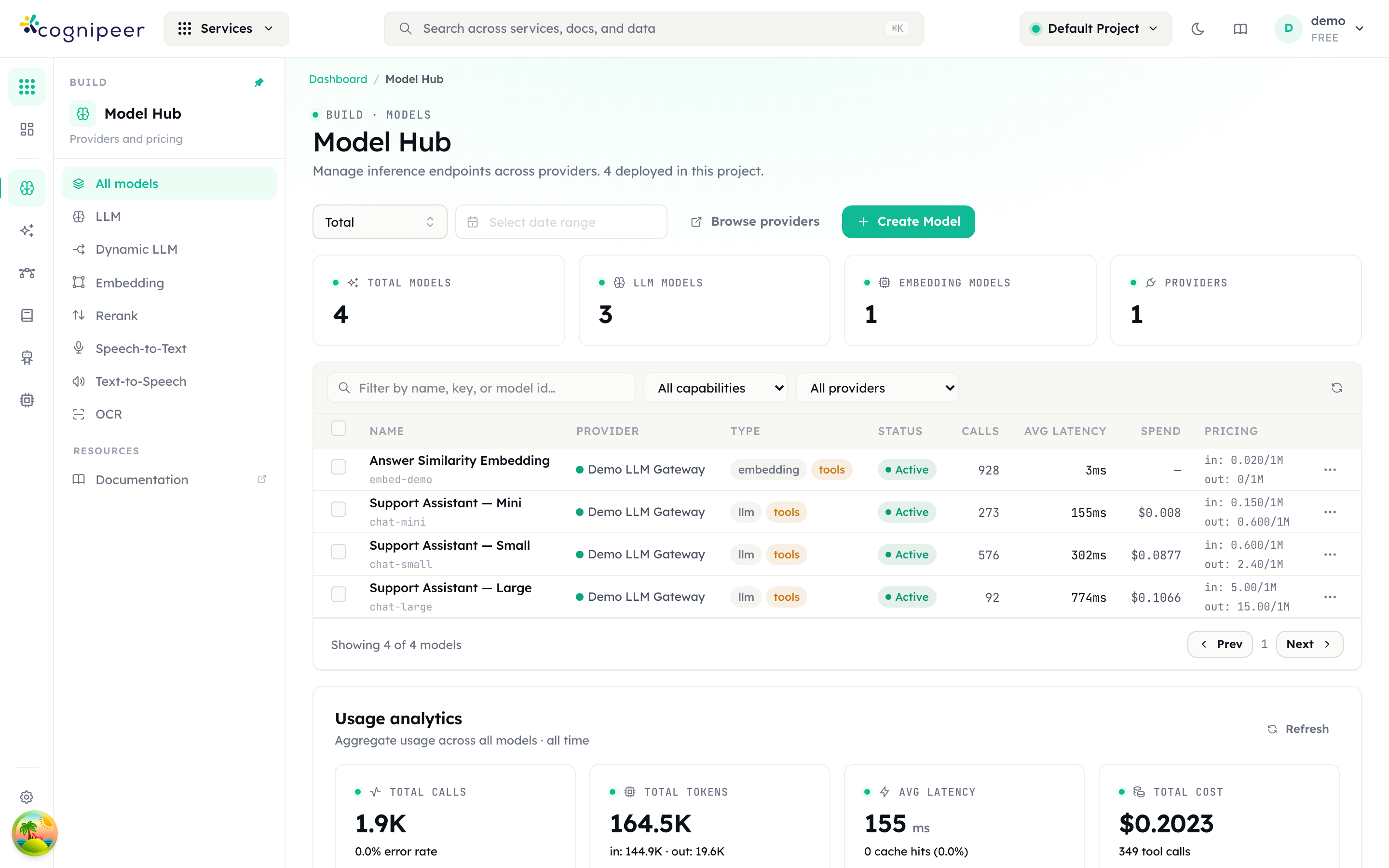
Left nav Build → Model Hub (/dashboard/models, eyebrow Build · Models).
The four tiles are Total models, LLM models, Embedding models and Providers, all scoped to the active project. The sub-nav filters the list by category: All models, LLM, Embedding, Rerank, Speech-to-Text, Text-to-Speech, OCR. The remaining sub-nav entry, Dynamic LLM, is not a filter — it opens the Create Dynamic LLM form. See Route requests with a Dynamic LLM.
Two buttons sit in the header: Browse providers (jumps to /dashboard/providers) and Create Model.
Step 2 — Add a provider, if you have none
Open Create Model. If the project has no model providers, section 1 shows an explanatory card with an Add provider button instead of the picker.
Add provider opens the Add Model Provider modal:
| Field | Notes |
|---|---|
| Driver | The integration contract, e.g. openai-compatible. Selecting it renders that driver's credential fields below the Configuration divider. |
| Key | Required, unique. How models refer to this provider. |
| Label | Required. The display name. |
| Description | Optional. |
| Active | "Inactive providers cannot be used to create models." |
Create Provider saves it and reopens the create-model form with the new provider ready to pick. Credentials are encrypted at rest and never returned to the UI.
Step 3 — Deploy the model
Create Model opens the full-screen Deploy model form — "Add a new inference endpoint backed by a configured provider." The right-hand column carries a live summary and a Pre-flight checklist; the footer counts progress as N of 4 ready.
1 · Provider
Pick the provider that will serve this endpoint. The card underneath confirms its label, status, driver and key.
2 · Identity
| Field | Notes |
|---|---|
| Display name | Required. Shows in the table and in tracing. |
| Key | "Leave blank to generate from the display name." Slugified to lower case; dots and hyphens survive, other punctuation is stripped. A collision within the project is suffixed -2, -3, and so on. |
| Model ID | Required. The provider-side identifier (placeholder gpt-4o-mini), forwarded upstream verbatim. |
| Category | Chips: LLM, Embedding, Rerank, Speech-to-Text, Text-to-Speech, OCR. The list is narrowed to what the selected driver declares; a driver that declares nothing offers LLM and Embedding. |
| Description · optional | Free text. |
The key and the model id are different things and are routinely confused. The key is what your clients send; the model id is what Console sends upstream. They may match, and often should not — gpt-4o-mini-eu pointing at gpt-4o-mini lets you repoint the upstream later without touching a single client.
3 · Capabilities
Supports tool calls and Multimodal (vision). Both are driven by the driver's declared capabilities, and neither can be changed here — see the call-out below.
When Category is OCR, an extra section 3a · OCR mode appears with Invocation mode (Native OCR / Vision LLM) and, in Vision LLM mode, an optional Extraction prompt.
4 · Pricing
| Field | Applies to |
|---|---|
| Currency | All categories. Defaults to USD. |
| Input · per 1M tokens | All. Carries the Fill from catalog button. |
| Output · per 1M tokens | All. |
| Cached · per 1M tokens · optional | All. Cached tokens are billed as a subset of the input count, not in addition to it. |
| Audio input · per 1K seconds | Speech-to-Text only. |
| Input · per 1M characters | Text-to-Speech only. |
| Pages · per 1K | OCR only. Token fields still apply in Vision LLM mode. |
Fill from catalog queries the model price catalog and fills input, output and cached in one go. It matches on the Model ID field, not the display name, so fill it in first — with the field empty you get "Enter a model ID first". A match reports its confidence (Exact, Normalized or Fuzzy); an ambiguous or missing match reports "No catalog match" and leaves your values untouched.
5 · Default parameters
Applied when callers do not send their own, and always overridable per request. Temperature and Max tokens are the common two. The rest of the section handles providers that reject parts of the OpenAI schema: Detected automatically lists what the gateway already knows to strip for this driver and model id, Drop detected parameters automatically is on by default, Also reject these extends the list, Extra request body (JSON) is merged into every request for parameters outside the OpenAI schema, and Forward unrecognised caller parameters is off by default.
Pre-flight and submit
The checklist has four items: Provider selected, Display name and Model ID set, Pricing configured, Category chosen. When all four are green, Create model is enabled.
Step 4 — Find the key and make the first call
In the list, the Name column shows the display name with the key in small monospace beneath it. That string is the only accepted model value.
Open the model to reach the detail page.
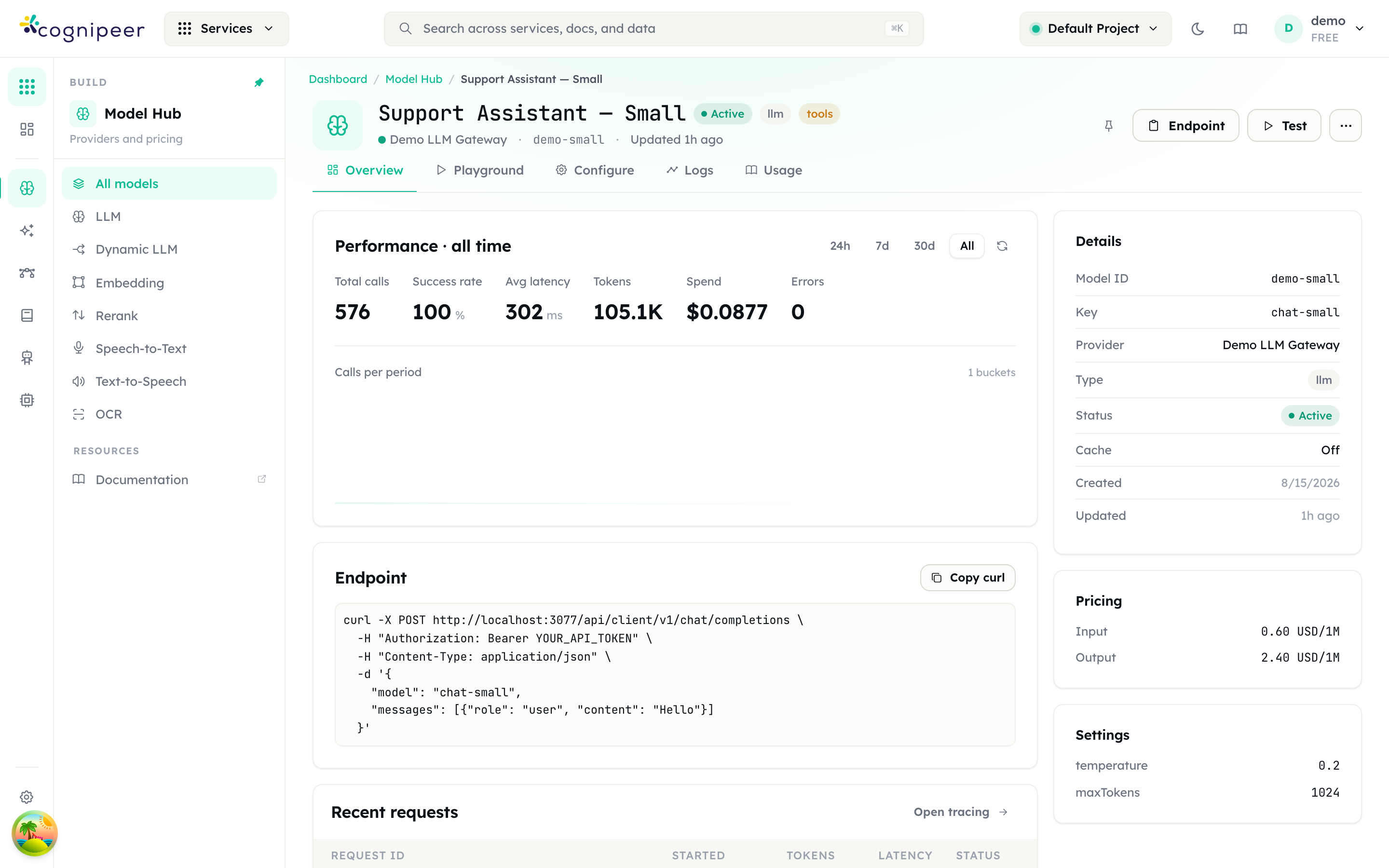
The tabs are Overview, Playground (LLM, STT, TTS and OCR models), Configure, Logs and Usage. The header Endpoint button copies the endpoint URL for this model's category; Test, shown only where there is a Playground, jumps to it.
| Category | Endpoint the Endpoint button copies |
|---|---|
| LLM | POST /api/client/v1/chat/completions |
| Embedding | POST /api/client/v1/embeddings |
| Speech-to-Text | POST /api/client/v1/audio/transcriptions |
| Text-to-Speech | POST /api/client/v1/audio/speech |
| OCR | POST /api/client/v1/ocr |
Rerank is not in that table because it has no entry of its own: the Endpoint button falls back to the embeddings path for a rerank model. Rerank models are driven through the reranker service instead — see Reranker.
The Usage tab shows Model key with a copy button, then ready-to-paste snippets: cURL, TypeScript SDK, Python (httpx) and, for LLM models, Python — OpenAI compatible. The equivalent by hand:
curl -X POST https://console.example.com/api/client/v1/chat/completions \
  -H "Authorization: Bearer cpeer_…" \
  -H "Content-Type: application/json" \
  -d '{
    "model": "gpt-4o-mini",
    "messages": [{ "role": "user", "content": "Hello" }]
  }'
The first successful call populates Calls, Avg latency and Spend in the list, and writes a row to the model's Logs tab.
The same thing over the API
Everything above is available to an API token under /api/client/v1. Auth is Authorization: Bearer cpeer_…; tenant and project come from the token record alone, never from the body, so a token can only ever create models in the project it was minted against.
| Method | Path | Purpose |
|---|---|---|
GET | /api/client/v1/models/providers | List model providers visible to the token's project |
POST | /api/client/v1/models/providers | Create a model provider |
GET | /api/client/v1/models | List models — ?category, ?providerKey, ?providerDriver, ?includeProviders=true |
POST | /api/client/v1/models | Create a model |
GET | /api/client/v1/models/:id | Fetch one |
PUT | /api/client/v1/models/:id | Update |
DELETE | /api/client/v1/models/:id | Delete |
RBAC service is models: GET needs read, writes need write, both checked against the token owner and further narrowed by the token's own service permissions. Provider CRUD under /api/client/v1/providers is an admin service and needs admin for writes.
Create a model
POST /api/client/v1/models requires name, providerKey, category, modelId, pricing and settings. settings is on the required list, so send {} when you have nothing to put in it — omitting it returns 400 settings is required.
curl -X POST https://console.example.com/api/client/v1/models \
  -H "Authorization: Bearer cpeer_…" \
  -H "Content-Type: application/json" \
  -d '{
    "name": "GPT-4o mini",
    "key": "gpt-4o-mini",
    "providerKey": "openai-main",
    "category": "llm",
    "modelId": "gpt-4o-mini",
    "supportsToolCalls": true,
    "isMultimodal": false,
    "pricing": {
      "currency": "USD",
      "inputTokenPer1M": 0.15,
      "outputTokenPer1M": 0.6,
      "cachedTokenPer1M": 0.075
    },
    "settings": {}
  }'
A successful create returns 201 with { "model": { … } }. key is optional and derived from name when omitted, using the slug rules described above. Sensitive settings fields (apiKey, secretAccessKey, serviceAccountKey, sessionToken) are masked as •••••••• on every read; a PUT merges incoming settings over the stored ones, so round-tripping a masked value preserves the real secret rather than destroying it.
List models
curl -s https://console.example.com/api/client/v1/models \
  -H "Authorization: Bearer cpeer_…"
The response carries both shapes: data is the OpenAI catalogue ({ id, object, created, owned_by }, where id is the model key), and models is the full Console record. OpenAI-compatible clients read data.
Three things that catch people out
Pricing defaults to zero — and a zero-priced model reports zero spend forever
This is the single most common setup mistake.
The create form starts at 0 for input, output and cached. The pre-flight item Pricing configured only checks that the fields are not blank, and zero is not blank, so the checklist goes green and Create model is enabled on a model that will never cost anything.
Cost is computed per request, from the model's pricing as it stands at that moment, and stored on the usage record. Correcting the price later applies to calls made after the change and to nothing else. There is no back-fill: the repricing tool under Cost & Optimization refuses Model Hub models outright, with "<name>" is a Model Hub model — its recorded spend is not repriceable here.
Every spend figure that reads from those rows — the Model Hub Spend column, cost reports, agent cost attribution, evaluation run costs — stays at zero for that window, permanently.
Set the price before the first call. Fill from catalog is the fastest route; otherwise type the rates in by hand. If you genuinely want a free model — a local runtime, say — leave the zeros deliberately and write it in the Description so the next operator does not read the flat spend line as a bug.
Capability toggles do not stick in the create form
Section 3 shows Supports tool calls and Multimodal (vision) as editable switches, but they are not. The form re-applies the provider driver's declared capabilities whenever either toggle diverges from them, so a change is reverted as soon as you make it. Where the driver declares no support, the switch is disabled outright.
Set capabilities after the model exists, on /dashboard/models/<id>/edit: tick Supports multimodal inputs or Supports tool calls, then Save changes. Everything else on the edit page — pricing, provider, key, request parameters, semantic cache — applies in place on save, with no separate publish step.
There is no status field
Models carry no status. The Status column in the list renders a hardcoded "active" badge on every row, and the Configure tab is entirely read-only — its own panel says "Configuration is read-only here. Use the edit page to change settings." and offers Open editor.
There is therefore no switch that takes a model out of service while keeping the definition. To stop traffic, delete the model — the row menu's Delete model, or the Delete deployment row in the Configure tab's Danger zone — or repoint the callers.
A request naming a key the runtime cannot resolve fails as HTTP 500 with Model with key <key> not found, not a 404. Sending an embedding, rerank, STT, TTS or OCR model to /chat/completions is also a 500, with Model is not configured for chat completions. Both look like server faults in a client's logs; they are configuration errors.
Also worth knowing
/dashboard/models/newis a redirect to/dashboard/models. The create form is an overlay, not a page of its own.GET /api/client/v1/modelsreturns every category. An OpenAI-compatible client pointed at Console lists your embedding and speech models next to the chat ones; hide them in the client. See Connect an OpenAI-compatible client.- Auth results are cached for 60 seconds, so a token you deleted can keep working for up to a minute.
- Token authentication is case-sensitive at the edge:
Bearercapitalised, or the request is rejected with 401.
Where to go next
- Connect an OpenAI-compatible client — point Open WebUI, LiteLLM or the OpenAI SDK at the model you just created.
- Model Inference — request and response shapes, honoured parameters, error handling.
- Chat Completions API and Embeddings API — the wire reference.
- Add a guardrail and PII protection — bind input and output safety policies to this model.
- Providers — provider domains, drivers and scoping.