
Crawl a website into the Knowledge Engine
Point a crawler at a documentation site, a help centre or a product catalogue, have every page converted to markdown, and have each page ingested into a Knowledge Engine module so an agent can answer questions from it. Re-run it on a schedule when the source changes.
Crawlers and the Knowledge Engine are both community features — no enterprise licence is required.
What you end up with
Crawler (config)  →  Job (one run)  →  Results (one row per URL)
                                            ↓  markdown body
                                   Knowledge Engine module
                                     chunk → embed → vector index
                                            ↓
                          POST /api/client/v1/rag/modules/:key/query
Concretely:
| Object | Where it lives | Notes |
|---|---|---|
| Crawler | Data → Crawlers | A saved container: engine, scope, HTTP options, extraction options, Knowledge Engine binding, webhook, schedule, and a URL list. |
| Job | Crawler detail → Runs | One run. Carries a frozen planSnapshot of the config used, plus counters. |
| Result | Run details modal | One row per fetched URL: html, file or error. HTML and converted files carry the extracted body. |
| Document | Data → Knowledge Engine → module → Documents | One per successfully ingested page, named after its URL. |
Before you start
| You need | Where | Why |
|---|---|---|
| An embedding model | Model Hub | The Knowledge Engine embeds every chunk. |
| A vector index | Knowledge Index | Where the embeddings are stored. |
| An active Knowledge Engine module | Data → Knowledge Engine → Create module | The crawler's module picker lists active modules only. |
| An API token (for the API section) | Settings → API Tokens → Create Token | Bound to the project active when it was created. See Authentication. |
RBAC crawler read + write | Member role or the token's service permissions | GET needs read, POST/PATCH/DELETE need write. |
Create the Knowledge Engine module first. If the project has no active module, the crawler's picker is empty and reads "No active Knowledge Engine modules found — create one in the Knowledge Engine page first".
Step 1 — Create the crawler
Open Data → Crawlers. The landing page tracks Crawlers, Active, Disabled and With Knowledge Engine.
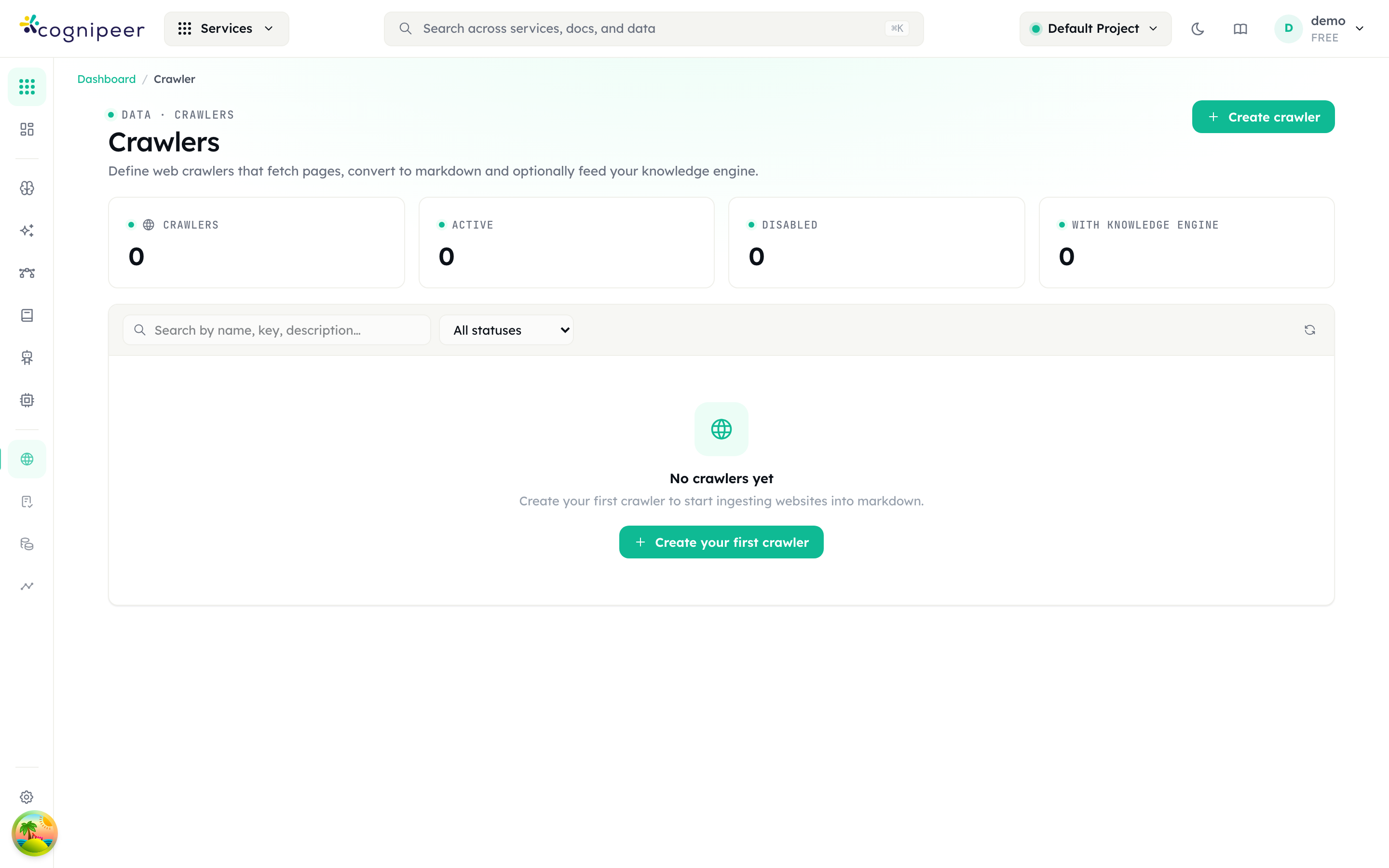
Click Create crawler. The full-screen form has three sections:
- Identity — Name (required, at least two characters) and Description.
- Seed URLs — URLs, one per line. Optional; you can add them later.
- Crawl behavior — Engine, Follow links discovered on each page, Link-follow depth (hint: "0 = only the seed URLs. Up to 3.") and Max pages (hint: "0 = unlimited.", default
50).
Create crawler saves it and opens the detail page.
Choosing an engine
| Option | Behaviour |
|---|---|
| Auto | Fetches statically first, then escalates to the browser engine when the response looks like a JS shell, an anti-bot interstitial (Cloudflare, DDoS-Guard, PerimeterX, …) or a host with a broken TLS chain. The default, and the right answer for most sites. |
| Axios (static) | Static fetch only. Fastest and cheapest; returns empty pages on client-rendered sites. |
| Playwright (JS) | Renders every page in a headless browser. Slowest; use when you already know the content is client-rendered. |
Link-following is off by default: with Follow links discovered on each page disabled, the crawler fetches exactly the URLs you gave it and nothing else. Depth is capped at 3 and pages at 5000 by the API schema.
Step 2 — Set the scope
On the crawler's Engine tab, the Engine & scope card holds the same behaviour settings plus the link filters. Same domain only, Include subdomains and the allow list apply only to links discovered while crawling — URLs you added by hand are fetched regardless. The block list is the exception: it is checked again at fetch time, so a URL on a blocked host is skipped even when you added it yourself, and no result row is written for it.
| Control | Effect |
|---|---|
| Same domain only | Discovered links must be on the seed's domain. On by default. |
| Include subdomains | Widens Same domain only to subdomains. Off by default. |
| Allow list (host glob, one per line) | If non-empty, only hosts matching one of these patterns are crawled. |
| Block list | Hosts matching one of these patterns are skipped. Evaluated first. |
Both lists match the hostname only, either exactly or with * as a wildcard — docs.example.com and *.example.com work, example.com/docs never matches anything. A non-empty allow list replaces the Same domain only check rather than narrowing it.
Save with Save engine settings.
Step 3 — Authentication and request tuning
The HTTP tab's Request card configures every fetch.
| Field | Default | Notes |
|---|---|---|
| User-Agent | A desktop Chrome UA string | Leave empty for the default. |
| Accept-Language | en-US,en;q=0.9,tr;q=0.8 | |
| Timeout (ms) | 30000 | Range 1000–120000. |
| Max concurrency | 5 | Range 1–16. Lower it if the target rate-limits you. |
| Bearer token | — | Sent as Authorization: Bearer … on every request. |
| Basic auth username / Basic auth password | — | HTTP basic auth. |
Custom headers (JSON: { "X-Foo": "bar" }) | — | Must be a valid JSON object. |
Cookies (JSON array of { name, value, domain?, path? }) | — | The practical way into a session-gated site: log in with a browser, copy the session cookie here. |
A new crawler is stored with http.retries: 2, so a failing fetch is attempted twice before the URL is recorded as an error — and permanent failures on the static path (404, 403, a DNS error, an untrusted certificate) are not retried at all. The dashboard does not expose the setting; http.retries accepts 1–5 over the API.
The two DANGER switches
Allow private network (DANGER: disables SSRF guard) turns off the check that refuses localhost, loopback, RFC1918, link-local and cloud metadata addresses. It also allows webhook delivery to those hosts.
Allow insecure TLS (DANGER: skips certificate verification) is rarely needed — for a site serving an incomplete certificate chain, the Auto engine already falls back to the browser engine with verification still on. Enable it only as a last resort, for a destination you trust.
Step 4 — Content extraction
Still on the HTTP tab, the Content extraction card decides what is stored and what reaches the Knowledge Engine.
| Field | Default | Notes |
|---|---|---|
| Output format | Markdown | "markdown keeps headings/links/tables; text flattens to clean plain prose (good for the Knowledge Engine, and sidesteps markdown-structure quirks)." |
| Clean up markdown | on | Decodes leftover HTML entities, drops dead #/javascript: links, collapses blank-line runs. Disabled when the output format is plain text. |
| Strip inline (base64) images | on | Keep it on — one page can otherwise carry megabytes of data: image payload straight into your chunks. |
| Main content only | off | Extracts the primary content region and drops nav, headers and footers. Turn it on for anything heading into retrieval. |
| Content selector (optional) | — | A CSS selector such as main, article or #content. Overrides the automatic heuristic. |
| Remove selectors (one per line) | — | Dropped before extraction — cookie banners, sidebars, "on this page" widgets. |
| Max body length (chars, 0 = no limit) | 0 |
For retrieval quality, the combination that pays off most is Main content only on, plus a few Remove selectors. Boilerplate that repeats on every page produces near-identical chunks that compete with real answers.
Linked PDFs, Word, PowerPoint, Excel, CSV and plain-text files are downloaded and converted to markdown as well, and stored as file results. Save HTTP settings saves this card and the Request card together — they are one form.
Step 5 — Wire up the Knowledge Engine and a webhook
Open the Knowledge Engine + Webhook tab.
In the Knowledge Engine card, enable Ingest fetched pages into a Knowledge Engine module and pick one under Knowledge Engine module. Every page — and every converted file — that produced a body is then ingested as its own document:
| Field on the document | Value |
|---|---|
| File name | The page URL |
| Metadata | source: "crawler", sourceUrl, crawlerKey, jobId, depth, title |
Ingestion failures are recorded on the crawl result and logged, but never fail the run. Each ingested result carries a Knowledge Engine status of indexed, skipped or failed. A result with no extracted body is never handed to the module and carries no status at all — that is what the run detail's No Knowledge Engine filter selects.
In the Webhook card, enable Send webhook for every page / completion, set Webhook URL, and choose which of page, completed and failed to receive. If you set an HMAC secret (optional), each request carries:
X-Cognipeer-Signature: t=<unix-seconds>,v1=<hex-hmac-sha256>The signature is HMAC-SHA256 over <t>.<raw-json-body> using your secret. Delivery is attempted up to three times, backing off 1 s then 2 s, with a 10 s timeout per attempt. Redirects are not followed, and private/loopback hosts are refused unless Allow private network is on.
Save with Save integration.
Step 6 — Add URLs and run it once
On the URLs tab, the URLs in this crawler card holds the list the crawler runs against:
- Add URL plus the Add button for one URL.
- Or paste multiple URLs (one per line) for a batch — it commits when the field loses focus.
- Each row's Crawl now action runs that single URL.
The One-shot crawl card next to it takes a URL and a Crawl now button. It uses this crawler's full configuration — engine, HTTP, extraction, Knowledge Engine binding, webhook — without adding the URL to the saved list. This is the fastest way to test extraction settings before committing to a full run.
The header button Run all (N) starts a job over the whole list. It is disabled while the crawler has no URLs, or if its status is not active.
Step 7 — Put it on a schedule
The Schedule tab has one card. Turn on Schedule recurring runs, then choose a Mode:
| Mode | Field | Constraints |
|---|---|---|
| Interval (every N seconds) | Interval (seconds) | Minimum 60, maximum 86400. 3600 is hourly, 86400 daily. |
| Cron expression (UTC) | Cron expression | Standard 5-field cron, evaluated in UTC. 0 */6 * * * is every six hours. |
Save schedule. The card then shows Next run at: and the previous Last run. Scheduled jobs appear in Runs with a schedule trigger; they always run against the saved URL list.
Schedules are dispatched by a background scheduler that ticks every 30 seconds, so a run may start up to half a minute after its nominal time.
Step 8 — Read the run
The Runs tab lists every job with Status, Started, Pages, Files, Errors, Duration and Trigger, filterable by status and trigger.
| Status | Meaning |
|---|---|
queued | Enqueued, not started. |
running | In progress. The list polls every two seconds while a job is active. |
succeeded | Finished with zero errors. |
partial | Finished, but at least one URL failed. |
failed | Something failed and no page or file was processed at all. |
canceled | Stopped via Cancel job. |
Click a row to open the full-screen run details. The left pane lists every result and filters by type (All types / Pages / Files / Errors) and by Knowledge Engine status (Indexed / Pending / Skipped / Failed / No Knowledge Engine). Selecting a row shows the extracted body, the HTTP status, the depth, the byte count and a rag: badge. Error rows show the fetch error instead of a body. A queued or running job can be stopped with Cancel job.
Failed pages are normal, not a malfunction
A real site will always yield some errors: dead links, 403s behind a WAF, PDFs that will not parse, redirect loops, timeouts. The crawler records each one as an error result and continues — one bad page never stops a run.
This is why the job status is partial and not succeeded whenever errorsCount > 0, even if 500 pages worked and two did not. Treat partial as the normal steady state, and watch the Errors column for a change in that number rather than expecting zero. To see the causes, open the run and set the type filter to Errors — each row carries the URL and the exact fetch error.
The same thing over the API
Every screen above maps to /api/client/v1/crawler/*, authenticated with a project-bound API token. The full reference is in the Crawler API.
HOST=https://console.example.com
TOKEN=cpeer_…

# 1. Create the crawler, already bound to a Knowledge Engine module
curl -X POST $HOST/api/client/v1/crawler/crawlers \
  -H "Authorization: Bearer $TOKEN" \
  -H "Content-Type: application/json" \
  -d '{
        "name": "Docs site",
        "key": "docs-site",
        "seeds": ["https://example.com/docs"],
        "engine": "auto",
        "autoCrawl": true,
        "maxDepth": 2,
        "maxPages": 500,
        "scope": { "sameDomainOnly": true, "includeSubdomains": false },
        "markdownOptions": {
          "outputFormat": "text",
          "mainContentOnly": true,
          "removeSelectors": [".cookie-banner", "nav", "footer"]
        },
        "rag": { "ragModuleKey": "support-kb", "enabled": true },
        "schedule": { "mode": "cron", "enabled": true, "cron": "0 3 * * *" }
      }'

# 2. Run it. Async is the default: you get a jobId back immediately.
curl -X POST $HOST/api/client/v1/crawler/crawlers/docs-site/run \
  -H "Authorization: Bearer $TOKEN" \
  -H "Content-Type: application/json" -d '{}'
# → 202 { "jobId": "6660…", "status": "queued" }

# 3. Poll the job
curl $HOST/api/client/v1/crawler/jobs/6660… \
  -H "Authorization: Bearer $TOKEN"

# 4. Read what was extracted, and what failed
curl "$HOST/api/client/v1/crawler/jobs/6660…/results?type=html&limit=100" \
  -H "Authorization: Bearer $TOKEN"
curl "$HOST/api/client/v1/crawler/jobs/6660…/results?type=error" \
-H "Authorization: Bearer $TOKEN"| Task | Endpoint |
|---|---|
| Manage the saved URL list | GET / POST / DELETE /api/client/v1/crawler/crawlers/:idOrKey/urls |
| Crawl an explicit set of URLs with a saved crawler's config | POST /api/client/v1/crawler/crawlers/:idOrKey/crawl |
| One-off crawl without saving a crawler | POST /api/client/v1/crawler/run |
| Stop a job | POST /api/client/v1/crawler/jobs/:jobId/cancel |
Two things worth knowing about run mode:
"mode": "async"(the default) returns202 { jobId, status }and notifies you via the webhook or a per-runcallbackUrl."mode": "sync"blocks until the crawl finishes and inlines the job counters plus up to 100 results — markdown included — in the response. Anything larger must be paged through/jobs/:jobId/results.
Regardless of Output format, the extracted body is returned in a field named bodyMarkdown. In plain-text mode it holds plain text.
Making the content answerable
Once a job reports pages as indexed, they are documents in the module. Open Data → Knowledge Engine, click the module, and check the Documents tab — one document per URL. The Playground tab runs a query against the module directly.
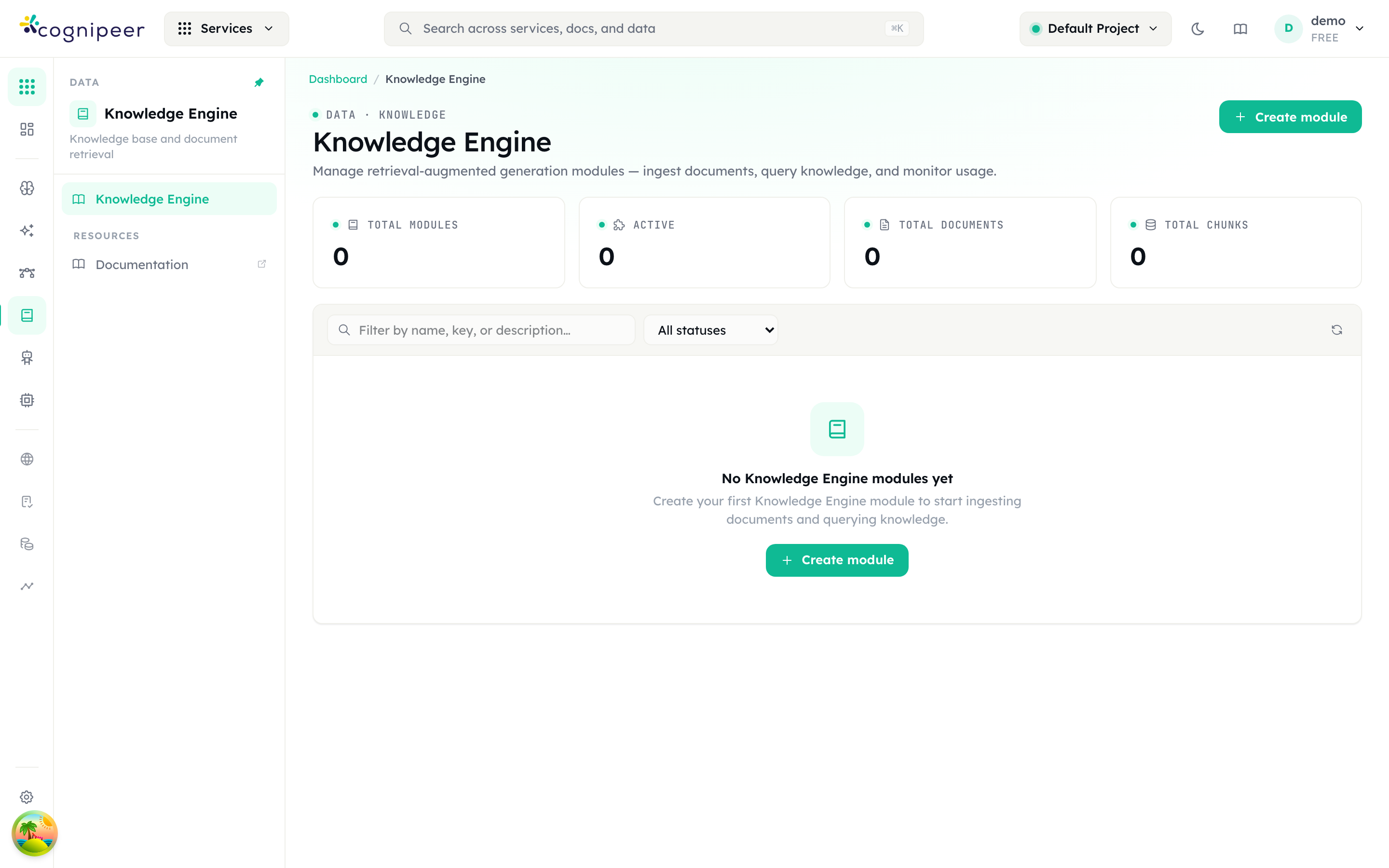
From an application, query the module by key:
curl -X POST $HOST/api/client/v1/rag/modules/support-kb/query \
  -H "Authorization: Bearer $TOKEN" \
  -H "Content-Type: application/json" \
  -d '{
        "query": "How do I rotate an API token?",
        "topK": 5,
        "filter": { "source": "crawler" }
}'{
"result": {
"matches": [
{
"id": "support-kb:6661…:3",
"score": 0.87,
"content": "To rotate a token, open Settings → API Tokens…",
"fileName": "https://example.com/docs/tokens",
"metadata": { "source": "crawler", "sourceUrl": "https://example.com/docs/tokens" }
}
],
"query": "How do I rotate an API token?",
"ragModuleKey": "support-kb",
"latencyMs": 142
}
}That metadata rides on every chunk, not just the document, so filter can scope a query to crawled content — or to one crawler, or one job — inside a module that also holds uploaded files. How precisely the filter is applied depends on the vector store behind the module. sourceUrl is what you cite back to the user.
To let an agent answer from it, attach the module in the agent's Configuration under Knowledge Engine — it becomes a retrieval tool the agent can call. Chunking, embedding, reranking and re-ingestion are covered in the Knowledge Engine guide.
Operational notes
Re-running creates new documents, it does not replace them. Each ingestion writes a fresh document, even when the file name (the URL) is identical. A daily scheduled crawl of 200 pages therefore adds 200 documents per day, and stale copies keep competing for retrieval slots. Prune the module's old documents as part of your refresh routine, or reserve a module for a crawler you rebuild rather than top up.
A paused module breaks ingestion silently. Ingestion requires the target module to be active. If it is not, every page's Knowledge Engine status becomes failed while the crawl itself still reports pages processed.
There is no robots.txt or sitemap support. The crawler does not read either file. Scope is entirely yours to define through the URL list, Link-follow depth, Max pages, the scope switches and the allow/block lists. Check that you are permitted to crawl the target, and keep Max concurrency modest on sites you do not own.
A crawler has no status control in the UI. The badge distinguishes active from disabled, but the field is only settable through PATCH /api/client/v1/crawler/crawlers/:idOrKey with {"status": "disabled"}. Running a disabled crawler returns 400 with … is not active.
Deleting a crawler leaves the ingested documents behind. It removes the crawler, its jobs and its results — the delete dialog says so — but nothing in the Knowledge Engine module. Clean those up separately.
Duplicate keys return 400, not 409. Creating a crawler whose key already exists in the project fails with Crawler key "…" already exists. Omit key and one is generated from the name with a random suffix, so it cannot collide.